The Best Symptom Tracker for Apple Watch (October 2026): Which Apps Log from Your Wrist
Symptoms rarely start when your phone is in your hand. Trace Health is a symptom and condition tracker for iPhone with a native Apple Watch app, built because our users asked for it again and again: raise your wrist, tap once, and the symptom is logged with its time and severity, in the same history, charts and doctor reports as on your iPhone. Below, every symptom tracker we found that logs from the watch, compared honestly, checked October 2026.
Quick answer
We build Trace Health, so read this with that in mind: every fact about another app below comes from its own App Store listing or website, checked on 10 October 2026. Most popular symptom trackers have no Apple Watch app at all. These are the ones that let you log from your wrist, and who each one suits.
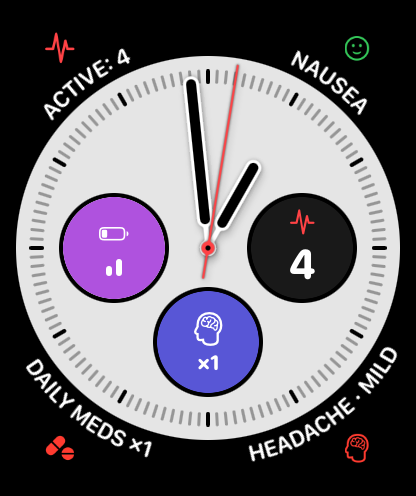
- Best overall for logging symptoms on the Apple Watch: Trace Health. One tap logs a symptom and steps its severity, complications put your symptoms on the watch face, a 7-day view shows each symptom's week, a page sets today's mood, and the Period page follows your cycle on a ring. No account, fully in nine languages, and your symptoms are written to Apple Health. The watch app is part of Premium ($29.99 a year).
- Best free watch app: Symptio. Its watch app is in the free version: pick a symptom, set its severity, confirm. In English, Spanish, Japanese, Korean and Chinese; new in 2026, with few ratings so far.
- Best for chronic pain and autoimmune conditions: Chronic Insights. Quick-record symptoms from the watch with its Premium ($30.99 a year); the watch app needs your iPhone nearby.
- Best for tracking your own metrics in many languages: Symp Trac. A native watch app with complications, 51 languages, new in 2026 with no ratings yet.
- For check-ins and reminders: CareClinic. Its watch app does quick check-ins, reminders and daily tasks.
- No Apple Watch app: Bearable, Guava, Juno, Rox, mySymptoms, Daylio, SympLog, Visible, Migraine Buddy and Manage My Pain.
- Built into the watch: Apple's Cycle Tracking logs cycle symptoms, and the Mindfulness app logs your state of mind.
Which symptom trackers have an Apple Watch app? (checked October 2026)
| App | Symptom logging on the watch | Other watch features | Watch app included in | Languages | Account |
|---|---|---|---|---|---|
| Trace Health | Yes: one tap, each tap steps Mild, Moderate, Severe, then Gone | Activity logging, complications, 7-day view per symptom, today's mood, your cycle on a ring with its calendar, logs wait on the watch when the iPhone is away | Premium ($29.99 a year) | English, Français, Deutsch, Español, Italiano, Nederlands, Polski, Português, Română | No |
| Symptio | Yes: pick a symptom, set severity, confirm | - | Free version (Pro $29.99 a year adds other features) | English, Spanish, Japanese, Korean, Chinese | No |
| Chronic Insights | Yes: quick-record symptoms | Needs the iPhone nearby (not standalone) | Premium ($30.99 a year) | English, French, German, Italian, Spanish, Chinese | No |
| Symp Trac | Yes: log symptoms in seconds | Complications | Not stated (Premium $39.99 a year for unlimited metrics) | 51 languages | No |
| CareClinic | Not described in its listing | Quick check-ins, reminders, daily tasks | Not stated | 72 languages | Yes |
| Welltory | No | Heart rate and HRV measurements | - | English, Russian, Spanish | Not stated |
| Bearable | No watch app | - | - | English | Yes |
| Guava | No watch app | - | - | English | Yes |
| Juno | No watch app | - | - | English, French, German | Yes (per its privacy policy) |
| Rox | No watch app (reads Apple Watch data on the iPhone) | - | - | English | Not stated |
| mySymptoms | No watch app | - | - | English | Yes |
| Daylio | No watch app | - | - | 34 languages | No |
| SympLog | No watch app | - | - | English | No |
| Visible | No watch app (uses its own armband) | - | - | English | Yes |
| Migraine Buddy | No watch app | - | - | 9 languages | Not stated |
| Manage My Pain | No watch app | - | - | English | Not stated |
| Apple (built in) | Cycle symptoms in Cycle Tracking | State of mind in the Mindfulness app | Free | All Apple Watch languages | Your Apple Account |
From each app's US App Store listing (supported devices, description, in-app purchases) and its own help pages, checked 10 October 2026. Yearly prices are US App Store prices. "Not stated" means the app's own materials don't say. Apps change: check the listing before deciding.
For the wider comparison, including apps without a watch app, see the best symptom tracker apps for iPhone (October 2026).
Trace Health on Apple Watch
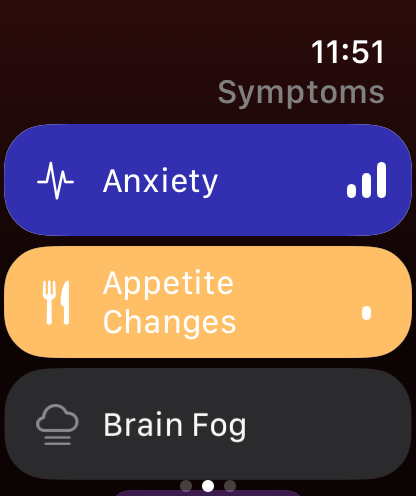
Yes, you can track symptoms from an Apple Watch. Trace Health has a native Apple Watch app that logs any symptom or daily activity with one tap, keeps your key symptoms on the watch face as complications, and shows the last seven days of any symptom. It syncs directly with Trace Health on your iPhone, with no account and no server of ours in between.
Bearable, Guava, Juno, Migraine Buddy, Visible and most popular symptom trackers have no Apple Watch app, so you can only log on your phone. Trace Health lets you log from the watch itself.
The Apple Watch app is part of Trace Health Premium and needs watchOS 11 or later, with Trace Health installed on your iPhone.
What you can do from your wrist
- Log a symptom in one tap. Each tap steps the severity from Mild to Moderate to Severe, then Gone, exactly like the iPhone dashboard.
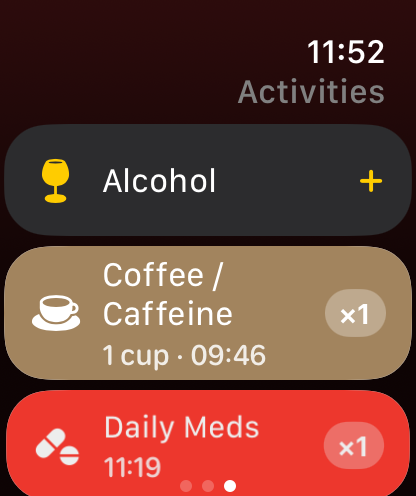
- Log daily activities too. Coffee, a walk, a medication, a late meal: whatever you track as a possible trigger or reliever, with today's count.
- Keep symptoms on your watch face. Complications show how many symptoms are active, which ones, and what you logged today, or give a chosen symptom or activity its own one-tap button. They work in the Smart Stack too.
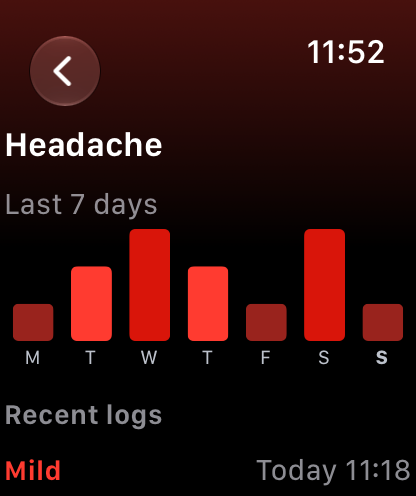
- See your week at a glance. The last seven days of any symptom, one bar per day by severity.
- Log when your iPhone is out of reach. Your taps wait on the watch and reach your iPhone as soon as the two are back in range.
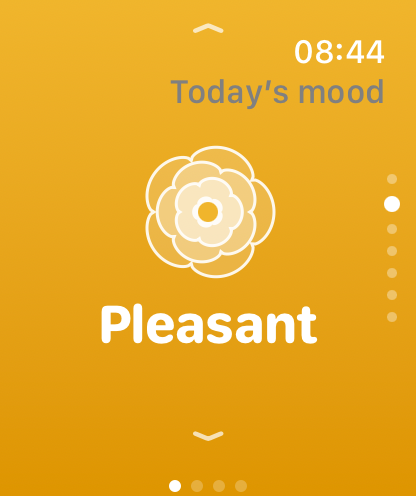
- Set today's mood. A page for your daily mood, one swipe away, and a watch face complication. It joins the same mood history and insights on your iPhone.
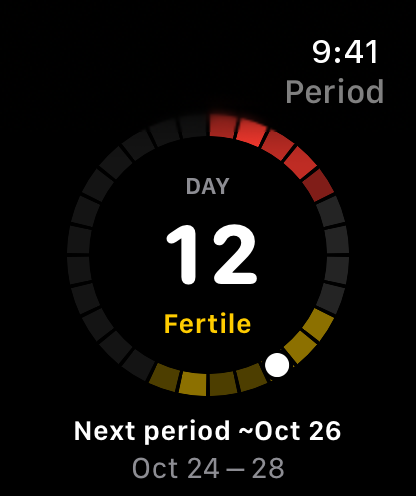
- Follow your cycle. The Period page shows your cycle day on a ring, with your period, fertile window and when your next period is due; tap it for the Cycle Calendar, and log Period Flow or Spotting right there. The Cycle complication keeps your cycle day on the watch face and in the Smart Stack. It shows while cycle tracking is on for your main profile; see the cycle tracker.
The mood you set on the watch also reaches Apple Health State of Mind when Export is on: see which mood trackers sync with State of Mind.
Symptio, a free watch app
Symptio is a symptom tracker from a Finnish developer, released in March 2026. Its watch app is part of the free version: pick a symptom, set its severity on a 1 to 10 scale and confirm. It needs no account and keeps data in your own iCloud. Symptio Pro ($29.99 a year) adds smart insights, family profiles, Apple Health sync and CSV export. It is in English, Spanish, Japanese, Korean and Chinese, and has few ratings so far.
Choose Symptio if you want watch logging without paying, in one of its languages. Choose Trace Health instead if you want one-tap logging that steps the severity, symptoms on your watch face, a 7-day view on the wrist, ready-made setups for 34 conditions, symptoms written to Apple Health, or French, German, Italian, Dutch, Polish, Portuguese or Romanian.
Chronic Insights, watch logging for chronic pain
Chronic Insights was made by a founder living with axial spondyloarthritis. You can quick-record symptoms on the Apple Watch with its Premium ($30.99 a year); the watch app is not standalone and needs your iPhone nearby. Its strengths are on the iPhone: a 3D body model you paint your pain onto, rheumatology questionnaires and unlimited free tracking of symptoms, medications and vitals. No account needed; in English, French, German, Italian, Spanish and Chinese.
Choose Chronic Insights if you want to map where your pain is. Choose Trace Health instead if you want logging to take one tap on the wrist and on the iPhone, with your taps kept on the watch when the iPhone is away, and symptoms written to Apple Health.
Symp Trac, your own metrics, in 51 languages
Symp Trac (not to be confused with Symptrac) lets you create your own health metrics or pick from 40+ Apple Health items, and has a native Apple Watch app with complications to log a symptom in seconds. It needs no account and is in 51 languages. Its free version is limited in how many metrics you track; Symp Trac Premium ($39.99 a year) unlocks unlimited metrics. It was released in March 2026 and has no ratings yet.
Choose Symp Trac if you want to design your own metrics from scratch. Choose Trace Health instead if you want ready-made setups for 34 conditions, one tap that steps a symptom's severity, trigger discovery and a doctor report.
CareClinic, check-ins and reminders on the wrist
CareClinic is an all-in-one care manager in 72 languages. Its Apple Watch app does quick check-ins and reminders and lets you tick off daily tasks; its listing does not describe logging individual symptoms from the watch. It needs an account.
Choose CareClinic if you mostly want medication and care reminders on your wrist. Choose Trace Health instead if you want to log each symptom, with its severity, the moment it starts.
Bearable, Guava, Juno and other trackers without a watch app
Checked on 10 October 2026, these popular apps have no Apple Watch app: Bearable, Guava, Juno, Rox, mySymptoms, Daylio, SympLog, Visible, Migraine Buddy and Manage My Pain. Several of them read data your watch records (Bearable syncs steps, sleep and heart rate from Apple Health, and Rox, Juno and Guava read wearable data), but you log symptoms on your phone.
Apple's own apps cover part of it for free: on the Apple Watch, Cycle Tracking logs cycle symptoms such as cramps or headaches, and the Mindfulness app logs your state of mind. Trace Health writes your symptoms and daily mood to Apple Health, so they sit next to what your watch records.
Why logging on the wrist makes a better record
In symptom tracking, timing is data. A symptom logged the moment it starts carries its real start time, and Trace Health uses those times to show when episodes begin, how long they last and how they change over weeks. A symptom remembered in the evening carries a guess.
The wrist is also where logging is still possible when the phone is not: in a meeting, on a walk, driving home, or in bed in the dark during a migraine, when a bright screen is the last thing you want. More complete logs mean clearer trigger patterns and a more accurate report for your doctor.
Especially useful for these conditions
- Migraine: log the attack as it starts, without looking at a bright phone screen.
- POTS and dysautonomia: log dizziness or a racing heart on standing, right where it happens.
- Perimenopause and menopause: tap each hot flash or night sweat as it comes and the daily count builds itself.
- IBS and gut symptoms: log a flare at work or on the move, next to what you ate.
- Anxiety and mood: log a panic attack discreetly, without taking out your phone.
- Long COVID and ME/CFS: record a crash with the least possible effort.
- Chronic pain and fibromyalgia: follow a flare's severity as it changes through the day.
Private by design, on the watch too
Your Apple Watch and iPhone exchange your logs through Apple's WatchConnectivity framework, directly between your paired devices. There is no account, and nothing passes through a Trace Health server. The watch keeps only what it needs to display, and deleting the app from the watch removes it. Logs made on the watch join your iPhone history like any other, so they follow your Apple Health sync and iCloud settings there. More in our private symptom tracker guide.
How to get it
- Install Trace Health on your iPhone.
- On your iPhone, open the Watch app and install Trace Health from Available Apps, or let it install automatically if automatic app install is on.
- In Trace Health on your iPhone, Settings, then Apple Watch, walks you through adding complications and using the app.
Requirements: an iPhone with Trace Health, an Apple Watch on watchOS 11 or later (Series 6 or later, SE 2nd generation, or any Ultra), and Trace Health Premium.
Limits, to be clear
- The Apple Watch app is a companion: it needs Trace Health on a paired iPhone. There is no Android or Wear OS version.
- It records what you log. It does not read heart rate or other watch sensors.
- Trace Health is a tracking tool, not a medical device, and does not diagnose.
Frequently asked questions
What is the best symptom tracker for Apple Watch?
For logging symptoms on the wrist, Trace Health: one tap logs a symptom and steps its severity, complications keep your symptoms on the watch face, a 7-day view shows each symptom's week, with no account and in nine languages; the watch app is part of Premium ($29.99 a year). Symptio has a free watch app, Chronic Insights quick-records symptoms with its Premium, Symp Trac has a watch app with complications, and CareClinic's watch app does check-ins and reminders (checked October 2026).
Is there a symptom tracker app for Apple Watch?
Yes. Trace Health has a native Apple Watch app: one tap on the wrist logs a symptom or a daily activity, complications keep your key symptoms on the watch face, and every log joins the same history, charts and doctor reports on your iPhone. It is part of Premium and needs watchOS 11 or later.
Does Bearable have an Apple Watch app?
No. Bearable has no Apple Watch app (checked October 2026); it reads steps, sleep and heart rate from Apple Health, but you log symptoms on your phone. Guava and Juno have no Apple Watch app either. Trace Health logs symptoms from the watch in one tap.
Is there a free symptom tracker for Apple Watch?
Symptio's watch app is part of its free version. The Trace Health watch app is part of Premium ($29.99 a year), while logging on the iPhone, from the dashboard, Live Activities and the Lock Screen, is free. Apple's built-in Cycle Tracking logs cycle symptoms on the watch for free.
Can I log a migraine from my Apple Watch?
Yes. With Trace Health you can log a migraine from your wrist the moment it starts, and tap again to raise the severity as it builds or mark it gone when it ends. You don't need to look at a bright phone screen, and the start time and duration are kept for your history and doctor report.
Can I track my cycle on Apple Watch with Trace Health?
Yes. The Period page shows your cycle day and today's phase on a ring of your cycle (period, fertile window, estimated ovulation, next period) and when your next period is due, and a tap opens the Cycle Calendar. Period Flow and Spotting log from the same page, and the Cycle complication keeps your cycle day on the watch face and in the Smart Stack. Part of Premium, watchOS 11 or later.
Does the Apple Watch app work without my iPhone nearby?
Yes, you can keep logging. Your taps wait on the watch and reach your iPhone as soon as the two are back in range, where they join your history. The watch app itself needs Trace Health on a paired iPhone.
Is the Trace Health Apple Watch app free?
The Apple Watch app is part of Trace Health Premium. The iPhone app's free tier covers one-tap logging, every symptom and condition in the library, charts, triggers and 30-day PDF reports; Premium adds the Apple Watch app along with Apple Health sync, widgets that log, custom symptoms, relievers, family profiles and full history.
Which Apple Watch models are supported?
Any Apple Watch that runs watchOS 11 or later: Series 6 and later, SE (2nd generation) and every Apple Watch Ultra.
Does the watch app read my heart rate?
No. Trace Health on Apple Watch records the symptoms and activities you log; it does not read heart rate or other sensors. On your iPhone, Trace Health can write your symptoms into Apple Health, next to the data your watch already collects, and import the workouts and sleep your watch records there, so a walk or a night's sleep shows up in Trace Health without logging it.
Log your next symptom from your wrist. Install Trace Health on your iPhone, add it to your Apple Watch, and your next symptom is one tap away.